


Integrations


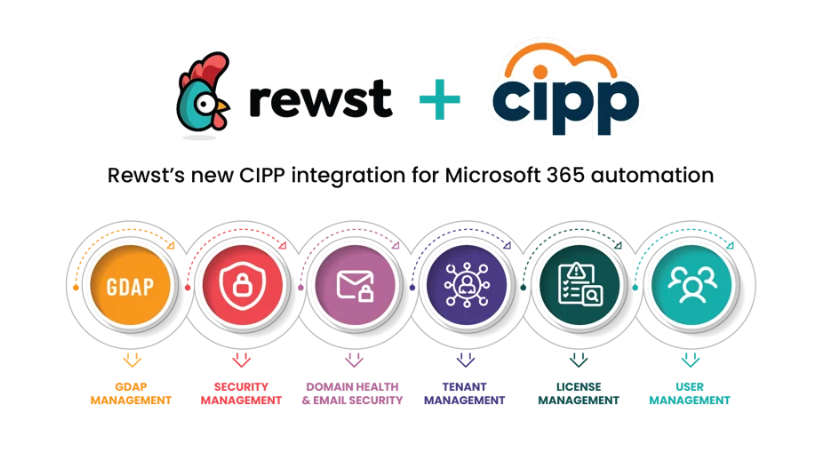
See how Rewst’s new CIPP integration helps MSPs automate Microsoft 365 work, strengthen tenant oversight, and cut down on repetitive daily tasks.
Most MSP teams have a running list of Microsoft 365 tasks that never quite slow down. You check access for one tenant, clean up a DNS issue in another, review MFA status elsewhere, and hope the scripts you rely on continue to behave. Tools like CIPP from CyberDrain exist because that rhythm wears on even the most seasoned engineers. CIPP provides a clearer view of what is happening across your tenants without requiring you to rebuild the same logic every week.
Rewst’s new CIPP integration builds on that approach by focusing on the CIPP capabilities MSPs typically reach for most—GDAP visibility, MFA and consent posture, domain and DNS checks, license insights, and tenant and user data. It leans into the areas where CIPP gives the strongest multi‑tenant signal and where Rewst can cut down the repetitive work that usually follows.
Core CIPP use cases for Microsoft 365 automation
Access and permissions management with GDAP automation
GDAP management and Microsoft GDAP roles
The pain without automation
Managing GDAP by hand creates a constant cycle of checking roles, validating access, and tracking onboarding progress. The shift from Delegated Admin Privileges (DAP) to Granular Delegated Admin Privileges (GDAP) in 2023 forced MSPs to rebuild access for every client they support. Many teams still manage lingering inconsistencies, missing roles, or stale permissions. Without automation, access drift often goes unnoticed until a technician loses the ability to perform work.
How Rewst solves it
Rewst uses CIPP’s GDAP insights as the data source for stable automation. Workflows can verify role mappings, surface expiring relationships, track onboarding progression, and notify teams before an access issue becomes a blocker. Rewst centralizes these checks so they run reliably on your schedule.
Where this helps in practice
Daily GDAP health digests can highlight missing or incorrect roles. Onboarding workflows use recommended defaults to create access invitations, track acceptance, and store compliance records.
According to CIPP founder Kelvin Tegelaar, the platform handled 60% of all Microsoft partner‑to‑customer access migrations globally during the GDAP transition, making it an ideal foundation for Rewst‑driven GDAP automation.
User management
The pain without automation
User updates show up constantly: mailbox permissions, SharePoint access, role changes, and password resets. These tasks interrupt technicians throughout the day. MSPs often track these changes manually or rely on inconsistent processes that vary by tenant.
How Rewst solves it
Rewst uses CIPP’s user metadata to build consistent workflows. This provides MSPs with a repeatable method for managing onboarding, offboarding, access adjustments, and billing-related updates, eliminating the need for ad-hoc manual steps.
Where this helps in practice
Joiner–mover–leaver flows align user access with role changes. Approval‑based permission updates become predictable and auditable. Quality-of-life automations, such as conditional access adjustments, room setup, or form-driven access requests, reduce the workload on dispatchers and engineers. These workflows rely on CIPP’s consistent data, which helps Rewst keep user access aligned across tenants.
Security posture and identity monitoring for MFA compliance
Security management and MFA compliance reporting
The pain without automation
Security oversight spreads across MFA enforcement, app consent requests, password hygiene, and authentication anomalies. MSPs supporting multiple tenants often struggle to maintain visibility across all users. MFA gaps and risky app consent decisions can take weeks to discover without automated checks.
How Rewst solves it
Rewst uses CIPP’s MFA posture and consent insights to run automated sweeps. These workflows identify non‑compliant users, send required prompts, surface risky OAuth scopes, and route findings to tickets or notifications.
Where this helps in practice
Exception sweeps identify MFA gaps with per-tenant context and generate follow-up tasks. Consent governance workflows review OAuth scopes, highlight risky apps, and request approval to revoke or restrict access. These checks rely on CIPP’s security data, while Rewst handles the scheduling, routing, and remediation.
Domain, infrastructure and tenant health across Microsoft tenants
Domain health and email security with DMARC, SPF, and DKIM checks
The pain without automation
DNS issues, such as misaligned SPF, DKIM, or DMARC, expired domains, or incorrect MX records, lead to email failures and security vulnerabilities. Email filtering tools cannot detect upstream DNS misconfigurations, and MSPs often catch these issues only after users report problems.
How Rewst solves it
Rewst uses CIPP’s domain and DNS data to automate checks across tenants. This helps MSPs detect misalignment or tampering early, long before clients experience undeliverable messages or degraded email security.
Where this helps in practice
DNS hygiene routines run weekly or monthly to detect drift, improper record changes, or expiring domains. Preflight checks before email cutovers validate SPF, DKIM, DMARC, MX, NS, and Whois records, reducing surprises during migrations or new service launches.
Tenant management
The pain without automation
Tenant inventory changes constantly, and manual tracking leads to outdated records and inconsistent reporting. A reliable inventory becomes even more important when MSPs support clients across different sizes, industries, and licensing footprints. Without automation, engineers often bounce between tenants to confirm basic details before acting, which slows down both troubleshooting and planning.
How Rewst solves it
Rewst uses CIPP’s centralized tenant metadata to keep inventories accurate and ready for tenant‑wide automation. Because the data comes from a single, consistent source, you avoid drift between systems and gain dependable context for every workflow, whether it’s security‑related, licensing, or operational.
Where this helps in practice
Teams apply baselines by tenant size or industry and sync tenant facts to documentation so information stays current. Rewst builds on CIPP’s metadata so these baselines adjust automatically when tenant configurations change. Many MSPs also use this inventory as the starting point for tenant‑wide reporting, targeted automations, and exception reviews.
License management
The pain without automation
Unused licenses and missed renewals lead to wasted spend and inconsistent reporting. Manual oversight becomes challenging as clients expand or reorganize their staff, and unused SKUs can remain unnoticed for months.
How Rewst solves it
Rewst uses CIPP’s license data to identify unused SKUs, track expirations, and alert teams before action is required. This ensures license usage stays aligned with each client’s needs and reduces unpredictable costs.
Where this helps in practice
Cleanup routines reclaim unused licenses, and renewal guardrails offer clear action steps with enough time to respond. MSPs can also create workflows that notify account managers of upcoming renewals or prompt approval workflows when license changes are needed.
Bringing the CIPP integration into your workflow
The CIPP integration provides MSP teams with a clearer way to manage tasks that can otherwise be spread across multiple tools and manual checks. It brings consistency to the work you handle every day and creates a stronger foundation for tenant-wide automation.
Access and permissions become easier to maintain when GDAP relationships stay in view. Security improves when MFA gaps and risky consent requests are identified and addressed on their own. Domain, infrastructure, and tenant health checks benefit from steady reporting that helps you resolve issues before they reach your users.
This integration supports the standards you set for your clients and reduces the time spent repeating the same checks across environments.
If you want to see how this fits into your workflows, schedule a Rewst demo and explore what this integration can unlock for your team, using examples drawn directly from your environment.



Related Posts
Many MSPs hit a growth ceiling they cannot immediately explain. Sales are closing and demand is steady, yet revenue ...
Meta description: Planning 2026 MSP automation? See which automation patterns actually held up in 2025, from PSA ...
A practical guide to PAM automation for MSPs, including identity verification, password rotation, JIT access, and ...